


PalmAgent ONE
3.431.00 Reviews
App Specs
- Version
- 4.8.5.1.6
- Updated On
- License
- Free
- Downloads
- 10,000+
- Developer
- PalmAgent
- Categories
- Finance
- Platform
- Android
Screenshots
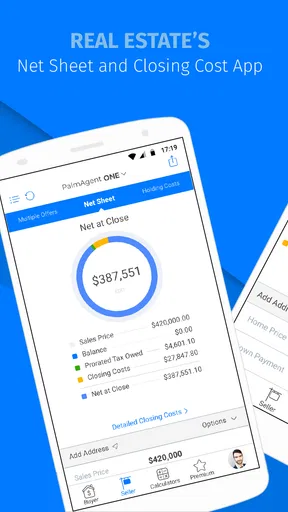
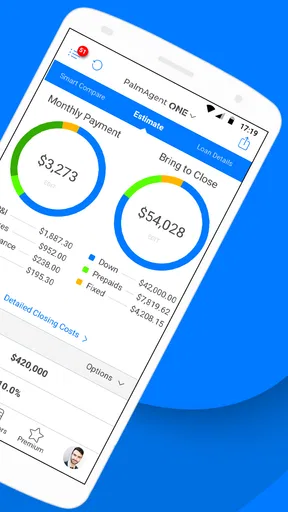
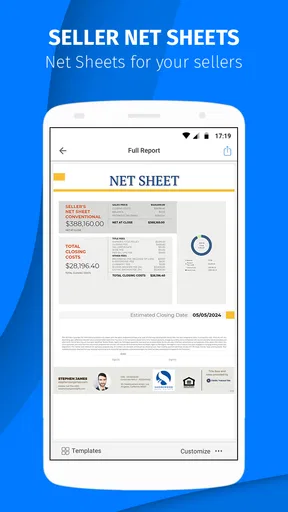


 Analysis by AppCompare
I approached PalmAgent ONE as a practical finance app rather than as a general money-management tool. Its focus is real estate professionals, and that distinction matters from the first use: this is not the kind of app I would choose to track household spending, compare bank accounts, or build a personal budget. I see it as a work companion for people who need real-estate information available while moving between appointments, calls, property visits, and office tasks.
The app is developed by PalmAgent and is free to install, although it includes optional in-app purchases ranging from $0.99 to $9.99 per item. That combination makes it easy to try without committing immediately, but it also means I would check which parts of the workflow are available at no cost before making it part of a daily business routine. The audience rating is Everyone, so the main question is not whether it is suitable for a particular age group; it is whether its professional focus matches the way you work.
How PalmAgent ONE fits into a real estate workday
In my experience, the strongest reason to consider this app is convenience. Real estate work often happens away from a desk, and a mobile tool can be useful when the alternative is opening a laptop, searching through scattered notes, or waiting until returning to the office. PalmAgent ONE is built around that professional context, so I would evaluate it by asking a simple question: does it reduce the number of steps between a client request and the information or action I need?
A realistic example would be a property professional leaving one viewing and preparing for another appointment. Instead of treating the phone only as a communication device, the app can serve as a dedicated place to handle real estate-related work while the schedule is changing. I would use it before the next meeting to review the information I need, then again afterward to keep the next task moving. The value is less about entertainment or broad financial education and more about keeping work accessible when the day refuses to stay organized.
That makes the app especially relevant to agents, coordinators, and other real estate workers who spend substantial time outside the office. It may also suit someone who already works with PalmAgent services and wants a mobile entry point rather than a completely separate system. On the other hand, a casual property buyer, tenant, or homeowner looking for a simple calculator or personal finance dashboard is likely to find the professional orientation unnecessary.
I would not describe it as a replacement for every tool in a real estate business. A mobile app can help with speed and access, but it does not automatically replace a full desktop workflow, a team communication platform, a document system, or a carefully maintained customer database. The best way to think about PalmAgent ONE is as one part of a working setup. Its usefulness depends on whether it connects naturally with the rest of the way you already manage property-related tasks.
The current experience and who benefits most
The current version is 4.8.5.1.6, and I would treat that version detail as a sign that the app has gone through multiple stages of refinement rather than remaining a one-off experiment. That does not prove that every workflow will feel modern, but it does give existing users a concrete version to compare when troubleshooting or deciding whether an update has changed their experience.
Worth Reading Before You Choose

EA SPORTS FC Mobile 26 Is a Bigger Football Game, but It Takes Time

Flipboard Shows What News Apps Must Do Beyond the Feed

Switching to Android Auto Means Rethinking Your Driving Routine

Google Calendar Makes a Crowded Week Easier to Manage

Ludo King Makes the Most of the Minutes Between Plans

Baby Panda World Brings Quick Play to Modern Phones, but Its Game Library Feels Busy
The app has been available since August 21, 2015, which gives it a long enough history to be judged as an established product instead of a brand-new release. Its audience is still specialized. I would recommend trying it if your daily work involves real estate operations and you want those tasks represented on a phone. I would skip it if you are searching for a broad, consumer-facing finance app, because the professional purpose is central to its identity.
Its average rating is 3.4, based on around 63 ratings and 31 reviews. I read that as a reason to test it personally rather than accepting either extreme: the app is not presented as universally loved, but neither is a middling score enough to dismiss it when the target audience is narrow. Specialized business apps can be useful to the right professional even when they are not appealing to a general audience.
The install figure is over 10,000, which suggests a real user base without making the app look like a mass-market finance platform. For me, that reinforces the importance of fit. I would not choose it because many people use it; I would choose it because its real estate orientation matches a specific work problem I have.
What the version history means for existing users
When an app reaches a version such as 4.8.5.1.6, I pay attention to continuity. Existing users usually care less about a dramatic first impression and more about whether familiar work remains dependable after updates. A professional app earns trust when the user can return to a known process without having to relearn everything each time.
For someone already using PalmAgent ONE, the practical approach is to update deliberately. Before relying on a new version during a busy day, I would open the workflows I use most, check that my usual information is still easy to reach, and confirm that any paid areas behave as expected. This is not because the app is necessarily difficult; it is because even a small change in a work tool can create friction when a client is waiting.
The long release history also changes how I would judge the interface. I would be more forgiving of a design that prioritizes established professional routines over visual novelty, provided the important actions remain clear. At the same time, a mature product should not get a free pass for confusing navigation. If an older workflow has accumulated unnecessary steps, the app’s age makes that a fair area to scrutinize.
There is another trade-off for existing users. Familiarity can be a strength: once a professional knows where to go, a stable tool may be faster than a fashionable but constantly changing alternative. Familiarity can also hide inefficiency. I would occasionally review how many separate actions a common task requires and compare that with the time saved by keeping everything mobile. If PalmAgent ONE is only being opened because it is familiar, rather than because it is genuinely faster, another workflow may be better.
Three practical ways I would use it
First, I would use the app as a transition tool between appointments. The overlooked advantage of a mobile real estate application is not simply having information on a phone; it is being able to use small gaps in the day productively. A few minutes before a meeting can be enough to prepare, verify the next step, or make sure a follow-up does not disappear into a notebook.
Second, I would make it part of a single-source habit. Rather than recording a task in the app, repeating it in a paper notebook, and then copying it into a desktop system, I would decide which part of the process belongs in PalmAgent ONE and stick to that choice. This reduces duplicate entry. The trade-off is that the app should not be forced to hold information that belongs in a more complete business system.
Third, I would use it as a focused professional tool instead of mixing work and personal finance. That separation is useful for people who want their real estate activity kept distinct from personal banking or budgeting apps. It also prevents a common mistake: expecting a specialist app to become a complete financial command center simply because it appears in the finance category.
One less obvious point is that a professional app should be tested under interruption. Real estate work involves calls, messages, travel, and sudden changes of plan. I would begin with a low-risk task, leave the app, return to it, and see whether the flow still makes sense. If the app remains easy to resume, that is more valuable to me than a polished first screen. A tool used in the field has to support partial attention, not just calm office use.
Where it may feel limited
The first limitation is scope. PalmAgent ONE is not the right choice for someone who wants ordinary personal finance features. If your goal is spending analysis, bill reminders, savings targets, or investment monitoring, a consumer finance application will almost certainly be a more natural fit. Choosing this app for those purposes would mean working against its professional design.
The second limitation is the possibility of dependence on a wider professional workflow. A mobile app can be convenient, but real estate work often involves records, communication, documents, and collaboration. I would not assume that one specialist app can cover all of those needs. If your team already relies on another platform, the important test is whether this application complements it or creates another place where information must be maintained.
The optional purchases deserve attention as well. Because the app is free to install but offers items from $0.99 to $9.99, I would identify the features I actually need before encouraging a whole team to adopt it. A free download is useful for evaluation, but the total cost of a professional workflow is determined by the functions people use repeatedly, not by the installation price alone.
The rating also suggests that the experience may not be equally smooth for everyone. I would be cautious about assuming that a feature that works well for one type of real estate professional will suit another. An individual agent, a coordinator, and a larger office may have different expectations about speed, organization, and handoffs. The more people depend on the same process, the more important it becomes to test the app with real tasks instead of judging it from a quick demonstration.
Device compatibility is another practical checkpoint. The app requires Android 7.0 or newer, so I would verify the operating system on any older work phone before planning around it. For a personal device this is usually simple; for a team with mixed hardware, it can affect rollout. A tool is only useful when the people who need it can run it reliably on the devices they carry.
How it compares with familiar alternatives
Compared with a general finance app, PalmAgent ONE has a narrower purpose and potentially a better professional fit for real estate work. A broad finance app may offer more personal money features, but those features can become distractions when the immediate task is property-related. I would choose the general option for household finances and the specialist option when the work itself is the priority.
Compared with a spreadsheet, the app’s appeal is mobility and focus. A spreadsheet can be extremely flexible, especially for custom calculations and office reporting, but it usually requires more setup and more discipline to keep usable on a phone. I would choose a spreadsheet when I need a tailored model; I would choose PalmAgent ONE when I want a purpose-built mobile workflow and do not want to construct that workflow myself.
Compared with paper notes, the decision is about retrieval and continuity. Paper can be faster for a quick thought, but it is easy to misplace, difficult to search, and awkward when several people need the same information. I would still keep a temporary note during a hectic moment, but I would move anything that affects the next client interaction into the proper digital process as soon as possible.
Compared with a full real estate management platform, this app may be easier to approach on the go, while the larger platform may offer stronger team oversight and broader administration. I would not call one universally better. If your priority is field access to a focused professional tool, PalmAgent ONE deserves a trial. If your priority is detailed reporting, centralized team control, or a complete end-to-end operation, a larger system may be the better foundation.
What I would check before committing
I would start with one recurring task rather than attempting to move an entire business into the app. Choose something that happens often, has a clear beginning and end, and can be evaluated without risking important client work. After several uses, ask whether the app saved time, reduced duplicate notes, or simply added another screen to the process.
I would also clarify the payment boundary before inviting colleagues to use it. Since optional purchases are available, the person testing the app should know which functions are essential and whether those functions are included in the free experience or require an item purchase. That small check prevents a common adoption problem: a team agrees on a tool, then discovers that different users have access to different parts of the workflow.
For privacy and professional responsibility, I would follow the same care I use with any business application. I would avoid putting sensitive client information into a tool unless it belongs there under my company’s procedures, and I would make sure important records remain available through the organization’s approved system. Convenience should improve a workflow, not become an excuse to scatter business information across personal devices and apps.
I would also test the app during the exact conditions in which I expect to use it: between appointments, while switching tasks, and when I have only one hand free. A product can feel perfectly acceptable at a desk and frustrating in a car park or hallway. That field test would tell me more than a short installation session, especially because the app’s main promise is practical access for real estate professionals.
My final view after weighing the trade-offs
I see PalmAgent ONE as a focused tool with a clear audience rather than a finance app for everyone. Its long availability, current version 4.8.5.1.6, and established install base make it worth examining for professionals who need a mobile route into real estate work. The free entry point is helpful, while the optional purchases mean I would evaluate the actual workflow cost before adopting it widely.
My recommendation is conditional but positive: try it if you are a real estate professional who wants a dedicated mobile companion and is willing to judge it against your own daily tasks. Start small, test it between appointments, and compare its speed with the desktop, spreadsheet, or paper method you currently use. If it removes repeated steps, it can earn a useful place in the routine.
I would pass on it if you are looking for personal budgeting, everyday banking, or a complete business-management platform. The average rating of 3.4 also tells me to keep expectations practical and to test rather than assume. The best reason to use PalmAgent ONE is not its category label; it is whether its real estate focus makes one specific part of your working day easier.
Pros
- Centralizes property listings
- contacts
- tasks
- and deal information in one app.
- Useful for agents who need access to client and property data while traveling.
- Helps organize follow-ups and daily real estate activities more efficiently.
- Mobile access can reduce reliance on spreadsheets and scattered notes.
- Designed for PalmAgent users
- supporting a more connected workflow.
Cons
- Requires a PalmAgent account or compatible platform access to be useful.
- Some features may depend on the subscription or permissions assigned by an office.
- New users may need time to learn the platform’s workflow and terminology.
- Performance and available tools can vary depending on the device and connection.
- Not intended for casual users looking for a general property-search app.
FAQs for PalmAgent ONE
What is PalmAgent ONE used for?
PalmAgent ONE is a mobile application designed for insurance professionals and field representatives who need access to policy, customer, and workflow information while away from the office. Depending on the user’s permissions and the connected insurance system, it can help with tasks such as reviewing account details, managing activities, checking documents, and staying updated while working with clients.
Who can use PalmAgent ONE, and is it available to everyone?
PalmAgent ONE is generally intended for authorized users of organizations that use compatible PalmAgent or insurance-management services. It is not usually a public consumer app that anyone can register for independently. Before downloading, confirm that your employer, agency, or service provider supports the application and that you have valid login credentials or an invitation to access its features.
Does PalmAgent ONE require an internet connection?
Most of PalmAgent ONE’s important functions depend on communication with an online account or back-office system, so an internet connection is normally required for signing in, synchronizing information, and retrieving current policy or customer data. Mobile data may work when Wi-Fi is unavailable, but performance can vary. Users should also avoid assuming that all information is available offline.
Is PalmAgent ONE secure for handling insurance and customer information?
PalmAgent ONE is built for professional use, where protecting account and customer information is especially important. Security can include authenticated access, permission-based features, and protected communication, although the exact safeguards depend on the organization’s configuration and service provider. Use a strong password, keep the app updated, avoid sharing credentials, and enable device security before accessing sensitive information.
What should I do if PalmAgent ONE does not work or I cannot log in?
If PalmAgent ONE fails to open, stops synchronizing, or rejects your credentials, first check your internet connection and confirm that you are using the correct account details. Updating the app and restarting the device may resolve temporary issues. If the problem continues, contact your agency administrator or PalmAgent support, since access permissions, account status, or system availability may require assistance.


